

Developer: Eduard Kozadaev


Player Statistics
Updated: November 8, 2026 1:55 AMAverage players
Players Online
PlayClaw :: Overlays, Game Recording & Streaming player count by month
PlayClaw :: Overlays, Game Recording & Streaming has 1 players in-game right now, and the 24-hour peak is 1. The peak so far in November 2026 is 1 players, 0 on average.
| Month | Average players | Change | Peak players |
|---|---|---|---|
| November 2026 (so far) | 0 | — | 1 |
From SteamStat's own samples of the Steam player count since tracking began. Change compares a month's average with the month before.
At a glance
PlayClaw :: Overlays, Game Recording & Streaming has 1 players in-game right now, 100% of its 24-hour peak of 1. The record since SteamStat started tracking it is 1 players, set on November 8, 2026. 26 Steam reviews rate it “Mixed” (69% positive). Released on November 20, 2017 by Eduard Kozadaev. Current price: $4.99.
Description
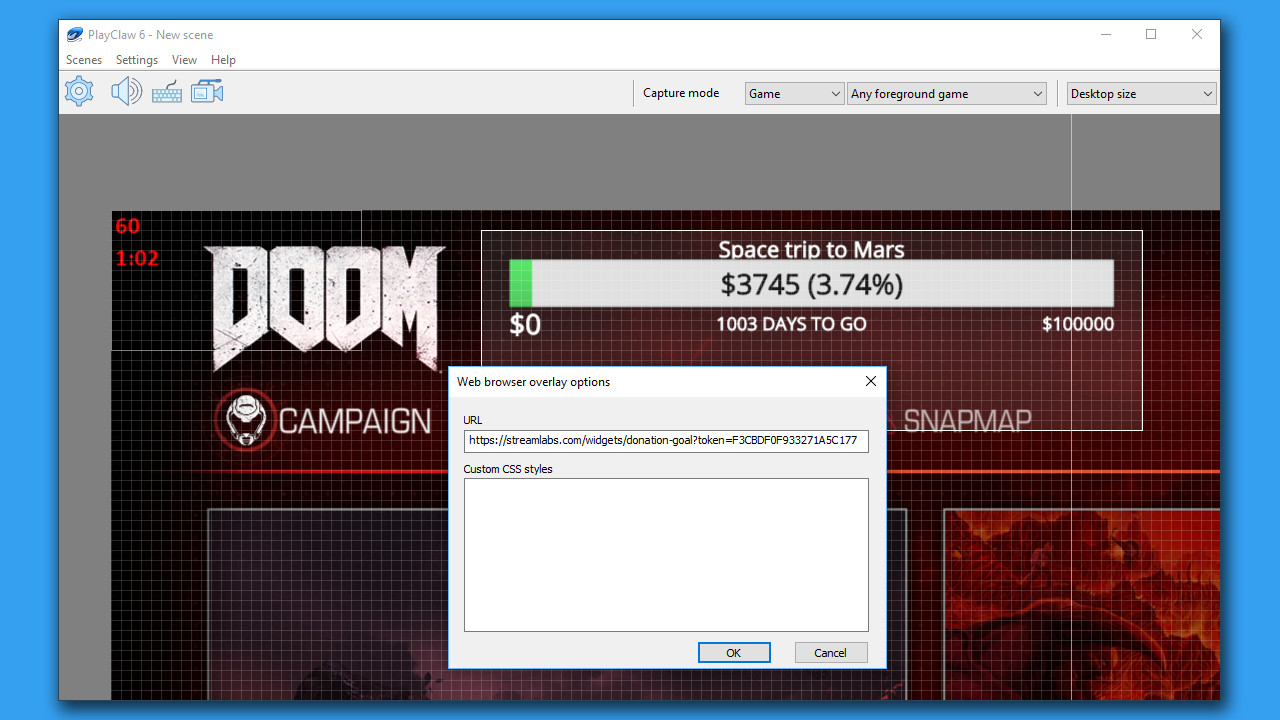
PlayClaw offers the ability to render helpful overlays in game and also in your recording if needed. PlayClaw has a set of various overlays such as System Information (CPU, GPU, RAM, HDD and other sensors), Teamspeak 3 and Discord overlays, Browser Overlay, Webcam Overlay, Timers and more.
PlayClaw has been designed to make full use of your GPU and hardware accelerated H.264 codecs that will ensure outstanding recording quality and have the least amount of impact on game performance. You'll be satisfied with the capture and encoding speed that PlayClaw offers during local recording sessions or streaming to YouTube, Twitch or other services!
Overlays:
- Very flexible System information overlay (GPU, CPU, RAM, HDD, FPS, Network sensors)
- Web Browser overlay (streamers love it!)
- Webcam overlay
- Teamspeak 3 overlay
- Image overlay
- Dynamic text overlay
- Powerful Time overlay with modes: Clock, Stopwatch, Timer
- Window capture overlay
- Color overlay
- And that's not all! We're developing new cool overlays for our customers
Capture features:
- Fast game capture up to 200fps
- Native capture available for DirectX 9, 10, 11, 12, OpenGL and Vulkan
- H.264 encoding with hardware acceleration (Intel QuickSync, NVidia Encoder, AMD AMF encoder)
- Streaming to YouTube, Twitch and other RTMP services
- Mixer FTL support
- Special capture desktop mode in Windows 7, 8 and 10
- Multiple display support
- Unique pre-recording feature
- Multi-threaded MJPEG software encoding
- Up to 16 audio sources
- Realtime audio preprocessing engine
- Output in multiple formats (AVI, MP4)
- Capture screenshots
- Adjustable video recording frame rate and size
Overlays output effects
- Chroma key
- Scrolling
- Color key
- Image mask
- Cropping / expanding
- More effects are coming in future updates
Additional features:
- Scene-based overlays settings
- Scenes can be switched at any time using hotkeys
- Simple and powerful visual overlays editor
- Profile-based capture and streaming settings
- Compatible with PunkBuster, Valve Anti Cheat, EasyAntiCheat and BattlEye
Supported languages: english, hungarian, russian, simplified chinese
Something wrong on this page? Let us know
Description and screenshots are provided by the publisher via the Steam Store page.
System Requirements
Windows
- OS *: Windows 7
- Processor: 2-cores CPU with SSE support
- Memory: 1 GB RAM
- Graphics: Intel/AMD/NVidia graphics card
- DirectX: Version 11
- Storage: 250 MB available space
- Additional Notes: Administrator rights to run software are mandatory.
- OS: Windows 10
- Processor: Intel SandyBridge CPU or AMD APU A10-58xx or better
- Memory: 4 GB RAM
- Graphics: NVidia Geforce 6хх or AMD Radeon HD 77xx or better
- DirectX: Version 11
- Storage: 250 MB available space
- Additional Notes: Administrator rights to run software are mandatory.
User Reviews
every time I restart my PC I have to re-do my overlays and settings. it's extremely annoying...
A very good way to put a crosshair overlay in the center of the screen
I have not tried streaming with this but for everything else the program works great when you know how to use it.
You can even vTube with it.
The only problem I hope one day gets fixed is recording over 20 minutes your gameplay "sound" goes out. If you are a commentator you can hear yourself just fine, it's the game audio that just cuts out and even the dev doesn't know why or how to fix it! (lol)
I've used this day in and day out for years (steam hours don't reflect usage) -- I use it to display general system stats as a small desktop overlay, I am not a streamer or anything, I am a big fan of it and would recommend it to anyone looking for a realtime desktop overlay. When I am in a pinch for desktop space I use it to overlay my tv shows as a semi transparent window so I can be productive at the same time. I've only ever had one thing I didn't like about the product, I reached out to the developer, they fixed it within a week. I am a strong proponent of this app, and I'd recommend it to anybody who can find a use for it.
depends on what you need it for, i bought it to have a ingame plugin for TS 3 and for that its good when it is working, most of the time there is an issue with the add in version for TS 3. so for that reason i gave up on using ist for the TS 3 plugin and have now only a clock overlay ingame and for that i dont need to pay 30.-.
Games similar to PlayClaw :: Overlays, Game Recording & Streaming



Additional Information
| Developer | Eduard Kozadaev |
| Platforms | Windows |
| Age rating | None |
| Release date | November 20, 2017 |
| User reviews | 69% positive (26) |
User Reviews
Active Players
Profiles with the most playtime in the last 2 weeks

